انتقل إلى معلومات المنتج
1 ل 3

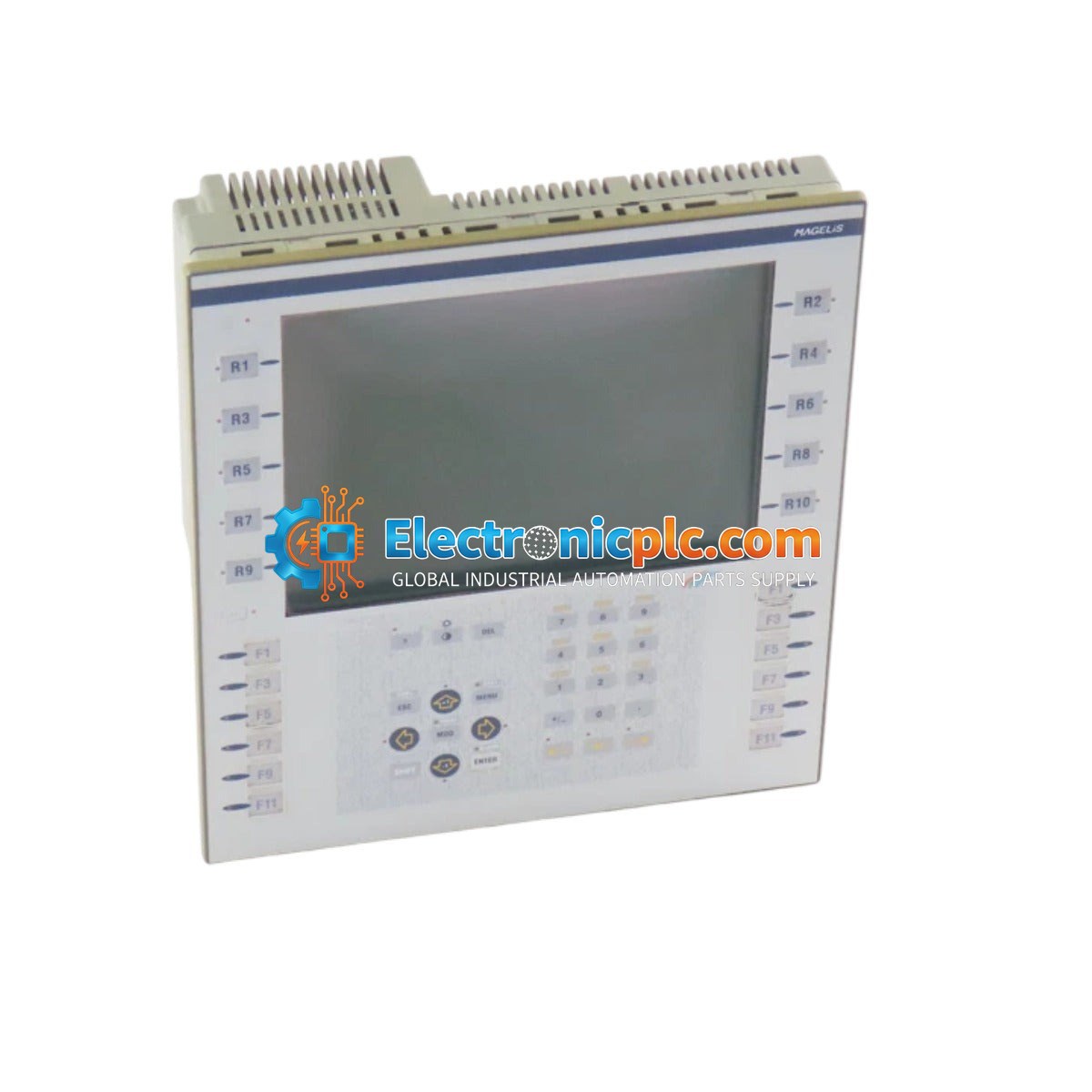
Schneider Electric XBT F024110 Operator Interface Panel

Schneider Electric XBT F024110 Operator Interface Panel

Description

The Schneider Electric XBT F024110 is an operator interface panel designed for industrial automation environments. This terminal serves as a human-machine interface (HMI), allowing operators to monitor system processes, adjust...

22 يشاهد الناس هذا الآن

التوافرالكمية المتبقية: 10

رمز المنتج: XBT F024110
بائع: Schneider

الشحن والإرجاع

توصيل موثوق به في جميع أنحاء العالم

  • شركات الشحن: يتم الشحن عبر DHL أو FedEx أو UPS أو USPS .
  • الشحن: تتم معالجة الطلبات خلال يوم عمل واحد إلى يومين، ويتم شحنها خلال 3 إلى 5 أيام عمل .
  • التتبع: يتم توفير تفاصيل التتبع الكاملة عبر البريد الإلكتروني عند الشحن.

ضمان استرداد الأموال خلال 30 يومًا

  • الضمان: فترة إرجاع لمدة 30 يومًا للمنتجات المتوفرة في المخزون والمغلفة من المصنع.
  • الشروط: يجب أن تكون المنتجات غير مفتوحة وغير مستخدمة وفي عبوتها الأصلية.
  • الأصالة: نضمن أن تكون الأجهزة أصلية 100% .

هل تحتاج إلى مزيد من التفاصيل؟ اقرأ سياسة الشحن وسياسة الاسترداد الكاملة.

الأصالة والضمان

  • ضمان أصلي: نحن نوفر فقط قطع غيار أصلية 100%، جديدة تمامًا، ومغلقة من المصنع .
  • تغطية كاملة: كل مكون مدعوم بضمان شامل لمدة 12 شهرًا من تاريخ الشراء.
  • إمكانية التتبع: جميع المنتجات تأتي مع وثائق المصنع الأصلية والملحقات اللازمة للامتثال الكامل للمعايير الصناعية.

الدعم الفني والتوريد

  • مساعدة الخبراء: يقدم فريقنا الفني استشارات مجانية لمساعدتك في التحقق من التوافق مع أنظمة DCS و PLC.
  • مصادر القطع النادرة: متخصصون في المكونات القديمة والتي يصعب العثور عليها من Allen-Bradley و Siemens و ABB و HIMA وغيرها.
  • للاستفسارات المتعلقة بالكميات الكبيرة: تواصلوا معنا على pambo@5gplc.com للحصول على أسعار الكميات الكبيرة أو عروض أسعار المشاريع المخصصة.
عرض تفاصيل المنتج الكاملة

Description

The Schneider Electric XBT F024110 is an operator interface panel designed for industrial automation environments. This terminal serves as a human-machine interface (HMI), allowing operators to monitor system processes, adjust parameters, and interact with connected programmable logic controllers (PLCs) or other control equipment. It is engineered for reliability in demanding industrial settings, providing clear visual feedback and input capabilities for machine control and data acquisition.

Features

  • Robust design suitable for industrial panel mounting.
  • Clear interface for real-time process monitoring and control.
  • Compatible with Schneider Electric automation ecosystems.
  • Reliable communication for efficient operator-to-machine interaction.

Applications

This operator interface panel is typically utilized in manufacturing, process control, and infrastructure automation. It is commonly deployed in applications such as machine tool control, assembly line monitoring, and general industrial automation systems where local operator intervention is required.

Technical Specifications

Product Model XBT F024110
Manufacturer Schneider Electric
Product Type Operator Interface Panel
Weight 2.7 kg

Installation Guidelines

  • Ensure the panel cutout dimensions are verified against the official installation manual before mounting.
  • Mount the unit in a clean, dry environment protected from excessive dust, moisture, and vibration.
  • Maintain adequate clearance around the unit to ensure proper ventilation and prevent overheating.
  • Use shielded communication cables to minimize electromagnetic interference (EMI) from high-voltage equipment.
  • Always disconnect power before performing any wiring or maintenance on the interface panel.
  • Ensure the unit is properly grounded according to local electrical codes to prevent electrical noise and potential damage.

FAQ

What is the primary function of the XBT F024110?

The XBT F024110 acts as an HMI (Human-Machine Interface), enabling operators to communicate with, monitor, and control industrial automation equipment.

Is this unit suitable for harsh environments?

While designed for industrial use, it should be installed within an appropriate enclosure (such as an IP-rated cabinet) if the environment contains high levels of dust, moisture, or corrosive gases.

What should I do if the screen becomes unresponsive?

First, verify the power supply connections and ensure the unit is receiving the correct voltage. If the issue persists, check the communication cables for damage or loose connections before contacting technical support.